¶ More Discord Tools
Arkon does more than run your Ark servers. This page covers the extra tools for your Discord community: translating chat, running contests, an AI chatbot, your own commands, and basic Discord moderation.
Each tool stands alone. Read only the sections you want.
All commands use the prefix + (the character you type before a command). Only +translate also works as the slash command /translate, and there is a Translate option in the message right-click menu. Everything else needs +.
Contents:
- Auto-translate (Fluent)
- Contests (Events)
- AI chatbot (Assistant)
- Custom commands and aliases
- Discord moderation basics
¶ Auto-translate (Fluent)
Fluent translates messages so players who speak different languages can chat in one channel. It can also translate one message on demand.
You need: Arkon in your server. The bot needs the Embed Links permission in the channel. Translation is free for you (the bot uses free translation services by default).
¶ Translate one message
Three ways, all open to everyone:
- Right-click menu. Right-click a message (on a phone, long-press it), choose Apps, then Translate. Only you see the answer. It translates into your server's primary language. Type
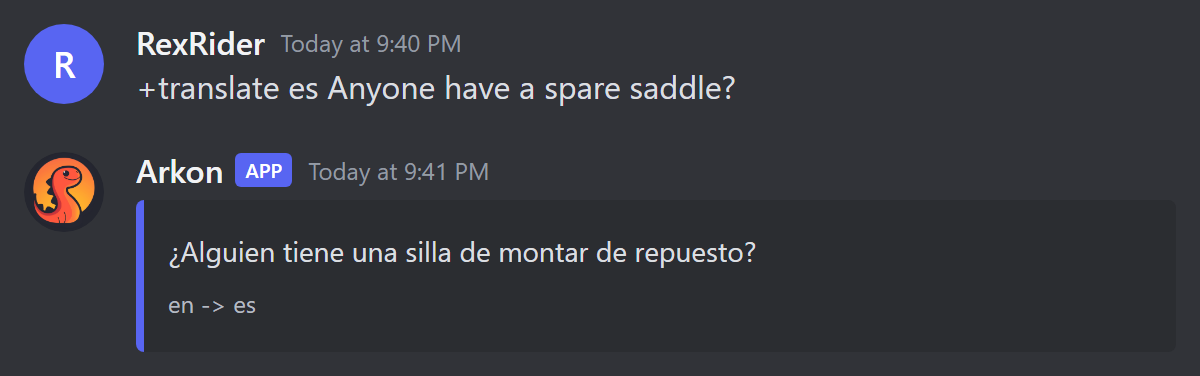
+serverlocaleto see which language that is. +translate <language> [text]. Example:+translate es Anyone have a spare saddle?. You can use a language name or a short code (es).- Reply. Reply to a message and type
+translate eswith no text. Arkon translates the message you replied to.
¶ Set up an auto-translated channel
¶ Step 1: Pick the channel and the languages
Decide the two languages (or one target language). Mods (Mod role or the Manage Messages permission) set this up.
¶ Step 2: Turn it on
Where: in the channel you want translated.
Two languages, both directions (a person writes in either, the other language comes back):
+fluent add english spanish
One language only (everything is translated into it, whatever language was written):
+fluent only english
You will see: "✅ Fluent channel has been set!" (for add) or "✅ Fluent channel has been set to translate all messages to english!" (for only).
To set up a different channel, add it at the end: +fluent add english spanish #chat. You can also give a category, and every channel in it is translated.
With
add, the first language is tried first. If most of your chat is in one language, type that one second. It saves translation work.
¶ Step 3: Check it worked
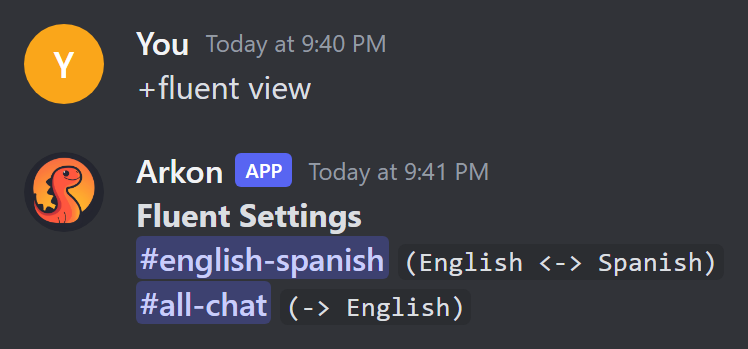
Type +fluent view. Then write a message in another language in that channel. Arkon replies to it with the translation.
Arkon skips messages that are only links, emoji, mentions, code, numbers or one letter. It never translates messages from bots.
¶ Translate buttons
A translate button sits under a message and shows the translation to whoever clicks it. It is handy for your rules post.
+fluent addbutton <message> <language> <button text>, for example +fluent addbutton https://discord.com/channels/... spanish Traducir. The <message> can be the message link or ID.
¶ Commands
| Command | Who | What it does | Example |
|---|---|---|---|
+translate <language> [text] (also /translate) |
Everyone | Translates text, or the message you replied to | +translate es Hello |
| Translate (right-click menu) | Everyone | Translates a message into the server language, shown only to you | |
+serverlocale |
Everyone | Shows the server language used by the right-click menu | +serverlocale |
+fluent add <language 1> <language 2> [channel] |
Mod | Translates a channel or category both ways | +fluent add english spanish |
+fluent only <language> [channel] |
Mod | Translates everything in a channel or category into one language | +fluent only english #chat |
+fluent remove [channel] (aliases delete, del, rem) |
Mod | Stops translating a channel or category | +fluent remove #chat |
+fluent view |
Mod | Lists translated channels | +fluent view |
+fluent addbutton <message> <language> <text> |
Mod | Adds a translate button to a message | +fluent addbutton <link> german Deutsch |
+fluent removebutton <message> <language> |
Mod | Removes that button | +fluent removebutton <link> german |
+fluent viewbuttons |
Mod | Lists all translate buttons | +fluent viewbuttons |
+fluent resetbuttontranslations |
Mod | Makes button translations get redone | +fluent resetbuttontranslations |
If you leave out the channel, the channel you typed in is used. The bot owner can connect paid translators (OpenAI, DeepL) for better quality. Without them, free Google Translate is used.
¶ Common problems
| Problem | Why it happens | Fix |
|---|---|---|
"The target language xx was not found." |
Language name or code not recognized | Use a plain name like spanish or a two-letter code like es |
| "Language 1 is invalid." / "Language 2 is invalid." / "Both of those languages are invalid." | A language was not recognized | Check the spelling |
| "Target language is invalid." | Same, for only and buttons |
Check the spelling |
| "You can't use the same language for both parameters. english to english is still english..." | Both languages are the same | Use two different languages |
| "❌ #chat is already a fluent channel." | The channel is already set | +fluent remove #chat, then add it again |
| "❌ #chat isn't a fluent channel!" | You tried to remove a channel that was never added | Check +fluent view |
| "There are no fluent channels at this time." | Nothing set up yet | +fluent add or +fluent only |
| "Could not find any content to translate!" | No text and no replied message | Add text, or reply to a message |
| "❌ No content to translate." | The right-click menu was used on an empty message (for example only an image) | Pick a message with text |
| "❌ Translation failed." | The translator did not answer | Try again in a minute |
| "That message already has a translation button for that language." | Duplicate button | Use +fluent viewbuttons |
| "No button found for that message." | Wrong message or language | Check +fluent viewbuttons |
| Nothing is translated in a channel | Message was only a link, emoji, mention or code, or the text was already in the target language | Expected. Send normal text |
¶ Contests (Events)
Events runs contests in your Discord. You set up a contest, members enter with a screenshot or a text entry, everyone votes with a reaction, and Arkon announces the winners when time is up. It can pay winners in the bank (the bot's built-in currency, see Economy).
You need: Arkon in your server and a channel where entries will be posted. In that channel the bot needs View Channel, Send Messages, Embed Links and Add Reactions (plus Attach Files for picture contests).
¶ Step 1: Create the contest
Where: any channel. You need the Manage Messages permission.
Type:
+events create
You will see: Arkon asks questions one at a time. Answer each in chat. Type cancel at any time to stop. In order, it asks for:
- The event name.
- A short description (1024 characters or fewer).
- The channel for entries (mention it, or say
here). fileortextentries.- How many entries each member may submit.
- How many winners (up to 25).
- Whether to add rewards (
yorn). A number pays that many bank credits to that winner automatically. Text is shown in the announcement only. Typeskipto skip one place ordoneto skip the rest. - How long it runs, like
7dor2w3d10h(minimum 10 minutes). - Whether a role is required, and whether members need all the roles or just one.
- How many days a member must be in the server (answer
nfor no limit).
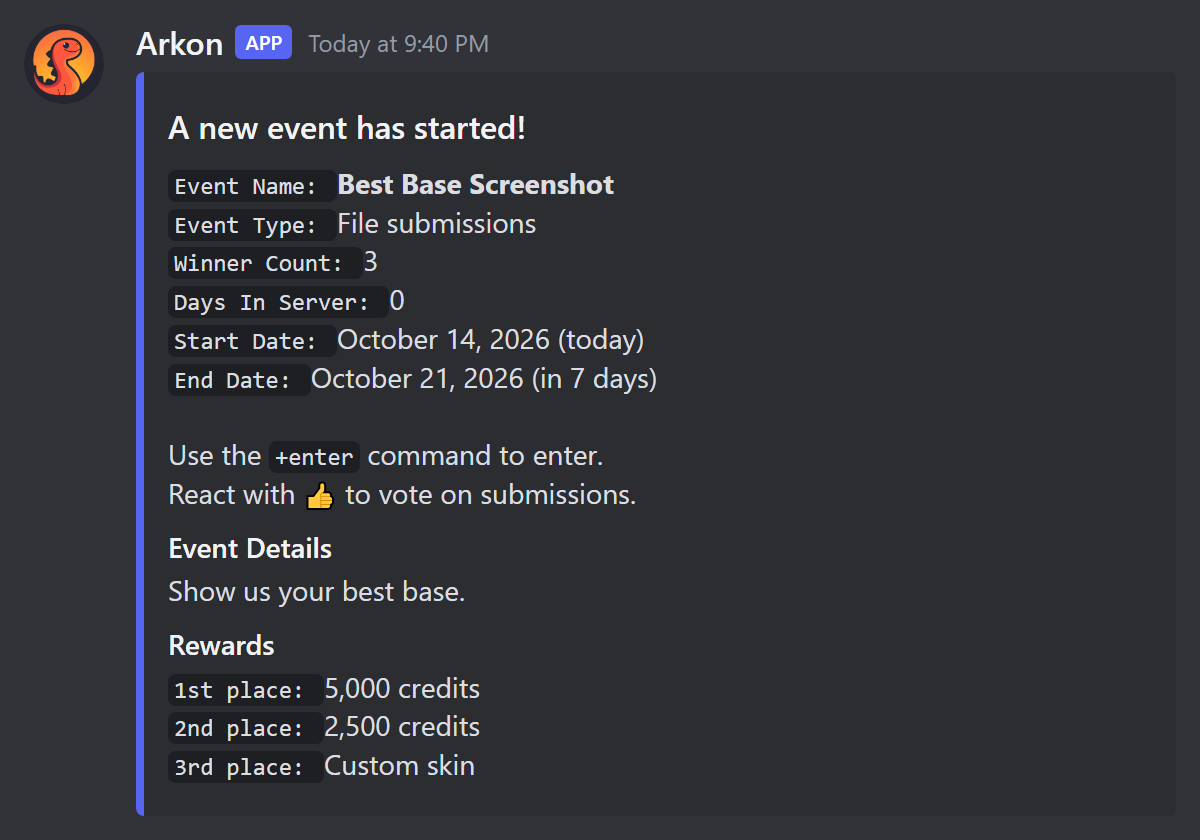
Arkon then posts "A new event has started!" in the entry channel.
¶ Step 2: Members enter
A member types +enter. If several contests are running they pick one. Arkon asks for the entry (a file with a description for picture contests). With more than one entry allowed, the member types done when finished. Arkon asks "Are you sure you want to enter with these submissions? (y/n)" and then posts each entry in the entry channel with a 👍 reaction. Members vote by clicking that reaction.
¶ Step 3: The contest ends
It ends by itself when the time is up (Arkon checks every minute). Arkon counts the reactions on each entry, ignoring votes from the entry's own author and from bots. Each member's best entry counts. Ties go to the entry posted first. Arkon posts the results, mentions the winners and pays number rewards.
To end early, type +events end.
¶ Step 4: Check it worked
Type +events view to see your running contests and settings.
¶ Commands
| Command | Who | What it does | Example |
|---|---|---|---|
+enter |
Everyone | Enter a contest | +enter |
+enotify |
Everyone | Turns pings on or off for yourself when contests start and end | +enotify |
+events view |
Manage Messages | Shows contests and settings | +events view |
+events create |
Manage Messages | Creates a contest (questions in chat) | +events create |
+events end |
Manage Messages | Ends a contest now and announces winners | +events end |
+events extend <time> |
Manage Messages | Makes a contest longer | +events extend 2d |
+events shorten <time> |
Manage Messages | Makes a contest shorter | +events shorten 1d |
+events remove <member> |
Manage Messages | Deletes a member's entries from a running contest | +events remove @RexRider |
+events delete |
Manage Messages | Deletes a contest, and optionally its messages | +events delete |
+events pingstaff |
Manage Messages | Toggles pinging staff roles when a contest ends | +events pingstaff |
+events staffrole <role> |
Manage Messages | Adds or removes a staff role | +events staffrole @Mods |
+events notifyrole <role> |
Manage Messages | Adds or removes a role pinged on start and end | +events notifyrole @Contests |
+events blacklistrole <role> |
Manage Messages | Adds or removes a role that may not enter (it can still vote) | +events blacklistrole @Muted |
+events blacklistuser <member> |
Manage Messages | Adds or removes a member who may not enter | +events blacklistuser @RexRider |
+events emoji [emoji] |
Manage Messages | Sets the vote emoji for new contests. Leave empty for the default | +events emoji :star: |
+events autodelete |
Manage Messages | Toggles removing a contest from the list once it ends | +events autodelete |
+events resultdelete |
Manage Messages | Toggles deleting the results post when you delete a contest with cleanup | +events resultdelete |
The "Manage Messages" commands need that Discord permission (Mod role alone is not enough). Time uses letters, like 10d or 7d4h.
¶ Defaults
| Setting | Default | Command |
|---|---|---|
| Vote emoji | 👍 | +events emoji |
| Ping staff at the end | Off | +events pingstaff |
| Auto-remove finished contests | Off | +events autodelete |
| Delete results post on cleanup | Off | +events resultdelete |
| Most contests at once | 25 |
With auto-remove off, a finished contest stays in the list until you run +events delete.
¶ Common problems
| Problem | Why it happens | Fix |
|---|---|---|
| "There are no events to enter at this time" | No contest exists | +events create |
| "You can only have up to 25 active events at a time" | The limit is reached | +events delete an old one |
"The event Name already exists!" |
Names must be unique | Pick another name |
| "I am missing the following permissions for that channel:" | The bot lacks a permission in the entry channel | Give it View Channel, Send Messages, Embed Links, Add Reactions (and Attach Files for file contests) |
| "You must mention the channel you want submissions to be sent to!" | You did not mention a channel | Mention it, or say here |
| "The event needs to be in a text channel, not a forum!" | Forum channels are not allowed | Pick a text channel |
| "You cannot enter events because you have been blacklisted!" | Member is blocked | +events blacklistuser removes the block |
| "You cannot enter events because one of your roles has been blacklisted!" | Role is blocked | +events blacklistrole removes the block |
| "You do not have any of the required roles to enter." | Missing the role | Get the role |
| "You have already submitted the max amount of entries for this event!" | Entry limit used up | Wait for the next contest |
| "UPLOAD A FILE" | This is a file contest and the reply had no file | Attach a file |
| "You are already in the middle of entering an event!" | An entry is still open for you | Finish it or type cancel |
| "That is not a valid time delta!" | Time was not understood | Use 7d, 4h or 7d4h |
| "There are no submissions for Name." | +events end on a contest with no entries |
+events delete instead |
¶ AI chatbot (Assistant)
Assistant is a chatbot that answers questions in your server using OpenAI (the company behind ChatGPT). Members talk to it with +chat, by mentioning it, or in a channel you pick.
You need: your own OpenAI API key (a long secret password that lets the bot use your OpenAI account). Arkon does not supply one and does not charge you for the chatbot. OpenAI bills your account for every answer.
The cost is per use. Longer conversations and bigger models cost more. Check OpenAI's pricing page, set a spending limit in your OpenAI account's billing settings, and use
+assistant set modelto pick a cheaper model if you want.
¶ Step 1: Get a key
Sign up at platform.openai.com, add billing, and create a key on the API keys page (https://platform.openai.com/account/api-keys). Copy it.
¶ Step 2: Give the key to Arkon
Where: any channel. You need the Admin role or the Administrator permission.
Type:
+assistant api key
You will see: a message with a Set API Key button. Click it, paste the key into the popup and submit. Only you see the popup. Arkon says "API key has been set!". To remove it later, run the same command and enter none.
¶ Step 3: Pick where it answers
+assistant set channel #ai-chat
Arkon now answers every message in that channel. Elsewhere, members use +chat <question>. To also let members mention the bot in any channel, run +assistant features mention-respond.
¶ Step 4: Check it worked
In the channel, type a question. Or type +chat Hello! anywhere. Arkon answers.
¶ Commands
| Command | Who | What it does | Example |
|---|---|---|---|
+chat <question> (alias +ask) |
Everyone | Ask the assistant a question | +chat How do I tame a Rex? |
+chathelp |
Everyone | Explains how to use it | +chathelp |
+convoclear (alias +clearconvo) |
Everyone | Resets your conversation in this channel | +convoclear |
+convostats |
Everyone | Shows how big your conversation is | +convostats |
+unchat |
Everyone | Cancels the answer being written | +unchat |
+assistant api key |
Admin | Sets this server's OpenAI key | +assistant api key |
+assistant set channel [channel] |
Admin | Sets the main answer channel. Run with no channel to clear it | +assistant set channel #ai-chat |
+assistant set listen |
Admin | Toggles the channel you type in as another answer channel | +assistant set listen |
+assistant set model [model] |
Admin | Picks the chat model | +assistant set model |
+assistant features enable |
Admin | Turns the assistant on or off | +assistant features enable |
+assistant features mention-respond |
Admin | Toggles answering when mentioned in any channel | +assistant features mention-respond |
+assistant prompt system |
Admin | Sets its personality and rules | +assistant prompt system |
+assistant view |
Admin | Shows the settings | +assistant view |
Conversations are kept per member per channel. Many more settings exist under +assistant (custom knowledge, limits, role rules). Type +assistant to see them.
¶ Common problems
| Problem | Why it happens | Fix |
|---|---|---|
| "No model API key or endpoint override is configured!" | No key set | Do Step 2 (+assistant api key) |
| "There are too many pending messages for this conversation. Please wait for the current reply." | Several questions sent at once | Wait, or +unchat |
| "You have been blacklisted from using this command!" | The member is on the assistant blacklist | An admin removes them from it |
| No answer in the channel | Assistant is off, or the channel is not set | +assistant features enable, then +assistant set channel |
| Answers stop and OpenAI errors appear | Your OpenAI account has no credit | Add credit in your OpenAI billing page |
¶ Custom commands and aliases
Custom commands make Arkon answer your own words. You type a short word like discord after the prefix, and Arkon replies with your invite link. Aliases give a short name to a command that already exists.
¶ Custom commands
¶ Step 1: Create one
Where: any channel. You need the Mod role or the Administrator permission.
Type:
+customcom create simple rules Read our rules in #rules
You will see: "Custom command successfully added."
¶ Step 2: Check it worked
Type the prefix followed by rules. Arkon replies with your text.
¶ Extras
- Random replies.
+customcom create random lottostarts a short chat where each message you send becomes one possible reply. Typeexit()to finish. - Fill-ins. Put
{author}(the person who typed it),{channel}or{server}in the text.{author.mention}pings them.{0}is the first word they typed after the command:+customcom create simple say You said: {0}. - Cooldown.
+customcom cooldown rules 30makes each member wait 30 seconds. Addchannelorguildat the end to share the wait across the channel or server. - The text must be 2000 characters or fewer, and the name cannot have spaces or match an existing command.
| Command | Who | What it does | Example |
|---|---|---|---|
+customcom create simple <name> <text> (alias +cc create, also add) |
Mod | Adds a command | +cc create simple rules Be kind |
+customcom create random <name> |
Mod | Adds a command with random replies | +cc create random lotto |
+customcom edit <name> [text] |
Mod | Changes the reply | +cc edit rules New text |
+customcom delete <name> (aliases del, remove) |
Mod | Deletes it | +cc delete rules |
+customcom cooldown <name> [seconds] [per] |
Mod | Sets or shows the cooldown. per is member, channel or guild |
+cc cooldown rules 30 |
+customcom list |
Everyone | Lists all custom commands | +cc list |
+customcom show <name> |
Everyone | Shows the replies, who made it and its cooldown | +cc show rules |
+customcom search <text> |
Everyone | Finds custom commands by name | +cc search rul |
+customcom raw <name> |
Everyone | Shows the reply text unformatted | +cc raw rules |
¶ Aliases
An alias is a nickname for a command. Example: +alias add bal bank balance makes typing bal after the prefix run the bank balance command. The alias runs as the person who types it, so they still need permission for the real command.
| Command | Who | What it does | Example |
|---|---|---|---|
+alias add <name> <command> |
Mod (or Manage Server) | Creates an alias | +alias add bal bank balance |
+alias edit <name> <command> |
Mod (or Manage Server) | Changes what an alias runs | +alias edit bal bank balance |
+alias delete <name> (aliases del, remove) |
Mod (or Manage Server) | Deletes it | +alias delete bal |
+alias list |
Everyone | Lists aliases | +alias list |
+alias show <name> |
Everyone | Shows what it runs | +alias show bal |
+alias help <name> |
Everyone | Shows help for the real command | +alias help bal |
¶ Common problems
| Problem | Why it happens | Fix |
|---|---|---|
| "There already exists a bot command with the same name." | Name is taken by a real command | Pick a different name |
| "Custom command names cannot have spaces in them." | Name has a space | Use one word |
"This command already exists. Use +customcom edit to edit it." |
Name already used | Use +customcom edit |
| "That command doesn't exist." | Wrong name | Check +customcom list |
| "The text response you're trying to create has more than 2000 characters." | Text too long | Shorten it |
| "You attempted to create a new alias with the name bal but that name is already a command on this bot." | Alias name is taken | Pick a different name |
| "You attempted to create a new alias with the name bal but that alias already exists." | Alias name is taken | +alias edit it |
| "You attempted to create a new alias for a command that doesn't exist." | The command word is wrong | Check the spelling |
| "There are no aliases on this server." | None made yet | +alias add |
¶ Discord moderation basics
These commands moderate your Discord server: kick or ban a member, clear messages, keep a log. They are separate from the game bans in Moderation, which ban a player's game ID from your Ark servers.
| Discord moderation (this page) | Ark moderation (Moderation) | |
|---|---|---|
| Affects | A person's Discord membership | A player's access to your game servers |
| Ban command | +ban @member |
+banplayer <game ID> |
| Needs RCON | No | Yes |
Two things share the word "cleanup".
+cleanuptyped in Discord deletes chat messages (this page). The in-game votecleanup, typed in Ark chat, removes beaver dams and dropped eggs (see In-game commands). They are unrelated.
You need: the bot needs the matching permission in Discord (Kick Members, Ban Members, Manage Messages). Its role must also sit above the roles of the people it acts on.
¶ Step 1: Pick the mod log channel
Where: any channel. You need the Administrator permission.
+modlogset modlog #mod-log
You will see: "Mod events will be sent to #mod-log." From now on every kick, ban and similar action gets a numbered case there. Run +modlogset modlog with no channel to turn it off.
¶ Step 2: Try a kick
+kick @RexRider Spamming links
You will see: "Done. That felt good." The reason goes into the audit log and the case.
¶ Step 3: Check it worked
Type +case 1 (or +casesfor @RexRider). You see the case.
¶ Moderation commands
"Admin or X" means the Admin role, or the Discord permission X.
| Command | Who | What it does | Example |
|---|---|---|---|
+kick <member> [reason] |
Admin or Kick Members | Kicks a member | +kick @RexRider Spam |
+ban <member or ID> [days] [reason] |
Admin or Ban Members | Bans. days (0 to 7) deletes that many days of their messages |
+ban @RexRider 1 Scamming |
+tempban <member> [time] [days] [reason] |
Admin or Ban Members | Bans for a while, then unbans | +tempban @RexRider 3d Cool off |
+softban <member> [reason] |
Admin or Ban Members | Kicks and deletes 1 day of their messages | +softban @RexRider Spam |
+massban <IDs...> [days] [reason] (alias +hackban) |
Admin or Ban Members | Bans many user IDs at once | +massban 111 222 Raid |
+unban <user ID> [reason] |
Admin or Ban Members | Unbans | +unban 111111111111111111 |
+rename <member> [nickname] |
Admin or Manage Nicknames | Sets a nickname, or clears it if left empty | +rename @RexRider Rex |
+userinfo [member] |
Everyone | Shows a member's details | +userinfo @RexRider |
+names <member> |
Everyone | Shows a member's old names | +names @RexRider |
+slowmode [time] |
Admin or Manage Channel | Sets slow mode here (0 seconds to 6 hours). Empty turns it off | +slowmode 10 |
+case <number> |
Everyone | Shows one mod log case | +case 3 |
+casesfor <member or ID> |
Everyone | Shows all cases for a person | +casesfor @RexRider |
+listcases <member or ID> |
Everyone | Same, as a plain list | +listcases @RexRider |
+reason [case] <reason> |
Case author or Mod | Adds or changes a case reason. You can edit your own cases | +reason 3 Posted scam links |
+modlogset modlog [channel] |
Server owner or Administrator | Sets the mod log channel | +modlogset modlog #mod-log |
+modlogset cases [action] |
Server owner or Administrator | Turns case logging on or off for one action (kick, ban...) | +modlogset cases kick |
+modlogset resetcases |
Server owner or Administrator | Deletes all cases (asks first) | +modlogset resetcases |
Voice commands (+voicekick, +voiceban, +voiceunban) also exist. Slash versions of these commands do not.
¶ Mod settings
Needs the server owner or the Administrator permission.
| Command | What it does | Default |
|---|---|---|
+modset showsettings |
Shows all the settings | |
+modset dm [on/off] |
Sends the person a DM with the reason before a kick or ban | Off |
+modset defaultdays <0-7> |
Days of messages deleted on ban | 0 |
+modset defaultduration <time> |
Length of a +tempban with no time given |
1 day |
+modset deleterepeats <2-20 or -1> |
Deletes a message repeated that many times. -1 turns it off | Off |
+modset mentionspam kick <number> |
Kicks anyone who mentions that many people in one message. 0 turns it off | Off |
+modset mentionspam ban <number> |
Bans for the same. 0 turns it off | Off |
¶ Deleting messages (cleanup)
+cleanup deletes recent messages in the channel you type it in. It needs the Mod role or Manage Messages for you, and Manage Messages for the bot. Discord only lets bots delete messages newer than 14 days. Pinned messages are kept unless you add True at the end.
| Command | Who | What it does | Example |
|---|---|---|---|
+cleanup messages <number> |
Mod | Deletes the last X messages | +cleanup messages 20 |
+cleanup user <member> <number> |
Mod | Deletes the last X messages from one person | +cleanup user @RexRider 10 |
+cleanup text "<text>" <number> |
Mod | Deletes the last X messages containing the text (use double quotes) | +cleanup text "free nitro" 50 |
+cleanup after <message ID> |
Mod | Deletes everything after a message. Or reply to a message and run it | +cleanup after 111111111111111111 |
+cleanup before <message ID> <number> |
Mod | Deletes X messages before a message | +cleanup before 111111111111111111 10 |
+cleanup between <ID one> <ID two> |
Mod | Deletes messages between two messages (older first) | +cleanup between 111 222 |
+cleanup bot <number> |
Mod | Deletes the bot's messages and commands typed to it | +cleanup bot 20 |
+cleanup self <number> [text] |
Mod | Deletes the bot's own messages, optionally matching text | +cleanup self 10 |
+cleanup duplicates [number] (alias +cleanup spam) |
Mod | Keeps one copy of repeated messages among the last X (default 50) | +cleanup duplicates |
+cleanupset notify |
Admin | Toggles the "N messages were deleted." note (it vanishes after 5 seconds) | +cleanupset notify |
Deleting more than 100 at once asks "Are you sure you want to delete 150 messages? (yes/no)". The note is on by default.
¶ Common problems
| Problem | Why it happens | Fix |
|---|---|---|
| "I cannot do that due to Discord hierarchy rules." | The bot's role is below the target's role | Move Arkon's role higher in Server Settings, Roles |
| "I cannot let you do that. You are not higher than the user in the role hierarchy." | The target has an equal or higher role than you | Use a higher-ranked mod |
| "I'm not allowed to do that." | The bot lacks the permission | Give it Kick Members or Ban Members |
| "Invalid days. Must be between 0 and 7." | Bad days value |
Use 0 to 7 |
| "User with ID 111 is already banned." | Already banned | Nothing to do |
| "It seems that user isn't banned!" | +unban for someone not banned |
Check the ID |
| "That user does not have any cases." | No cases yet | Expected |
| "That case does not exist for this server." | Wrong number | Check +casesfor |
| "You are not authorized to modify that case!" | Only mods and the case's author can edit | Ask a mod |
| "Nicknames must be between 2 and 32 characters long." | Nickname length | Change length |
| "Try a smaller number instead." | Huge cleanup number | Use a smaller number |
Nothing was deleted by +cleanup |
Messages are older than 14 days or pinned | Expected |
+banhere bans a person from Discord only. It does not ban their game ID. To ban a player from your Ark servers use+banplayer(Moderation).